
Additional donations can be made by sponsors who would like to give an extra gift to their sponsorship, for example during a birthday or holiday.
Important Notes about One-Time designated donations vs Additional:
- If Allow One-Time Donations has been included in a Sponsorship Type, it will be an available donation option from the Sponsorship Profile, and when an admin enters a donation. However, the “One-Time Donation” will not count towards a sponsor’s sponsorship.
- If a sponsor makes an additional donation toward their sponsorship, it will be included in Tracked Giving and listed in the sponsorship-supporter record.
- Additional donations will not alter the recurring giving amount for the sponsorship. To do this, please refer to our Updating Sponsorships Costs and Shares article.
Additional Sponsorship Donation from Donor Portal
Once a sponsor is actively donating to a sponsorship, the sponsor can add a one-time donation to their sponsorship when logged into their Donor Portal. This is a means for the sponsor to give an extra donation to their sponsorship, most commonly for a birthday or holiday.
This one-time donation will be included on their Sponsorship Supporter record and counted towards their Total Given for their sponsorship.
To do so, a sponsor will need to login to their Donor Portal.
- Next to the Sponsorship’s Name, click Actions > New Donation
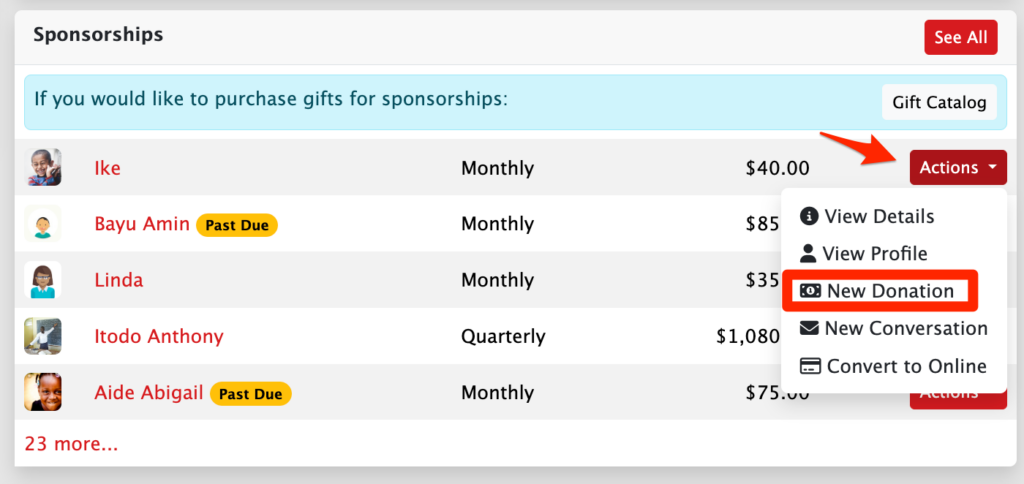
- This will pre-populate a Donation Form with the purpose being the Sponsorship.
- From there, the sponsor can simply add in the donation amount and proceed with completing their donation using their stored contact and payment information.
Adding a one-time Sponsorship Donation as an Admin
Admins can enter or process an additional donation on behalf of a current sponsor, and direct it to an existing sponsorship.
This one-time donation will be included on their Sponsorship Supporter record and counted towards their Total Given for their sponsorship.
However, as noted in yellow on the donation form, this does not initiate a recurring sponsorship for the supporter. This is a one-time donation. Recurring sponsorship donations must be initiated from the sponsorship record to be set up correctly. Please refer to our Starting a Sponsorship article to learn more.
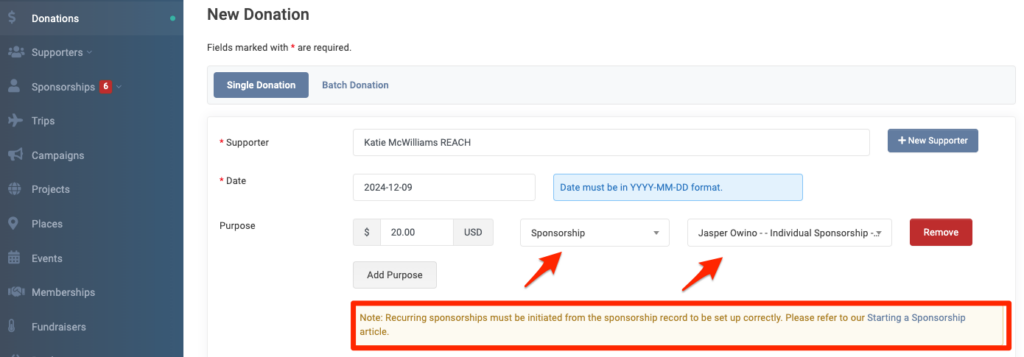
- Go to Donations > + New Donation
- Type in your Supporter’s name
- Add an amount and under Purpose, choose Sponsorship
- The supporter’s sponsorships will auto-populate allowing you to select the Sponsorship
- To split the donation if there are more than one Sponsorship, click Add Purpose and do the same for the new Sponsorship
- Select the Payment Type
- Since this is not meant to be a recurring donation, do not check the box to Make a recurring donation.
- Click Create
- If this is an Online donation, you will then be able to Select the Payment Method to use from your supporter’s payment methods on file on the next screen to complete the donation.
Once completed, the donation will be listed in the supporter’s Sponsorship-Supporter record and the amount will count towards the Total Given for the sponsorship.