


The REACHpay Payout Reconciliation Report allows you to review and reconcile donations processed through REACHpay with your bank deposits.
This report is available exclusively to organizations using REACHpay as their payment gateway.
Accessing the Report
To run the report, go to:
Reports > REACHpay Payout Reconciliation Report

Available Filters:
- Quick Date Range
- Custom Date Range (Start Date and End Date)
- Column Selector (choose which data columns to display)
Note: The date filter for the Payout Reconciliation Report will filter for payouts during that date range, and their associated donations.
After setting your filters, click Search to generate the report.
Using the Report
The report displays payout details, with associated donations, to help with reconciliation. The line items shown in the report are the payout’s line items, matched up with any associated donations. Since payouts only include transactions up to two business days before payout date, the last available day of data will be two days prior.
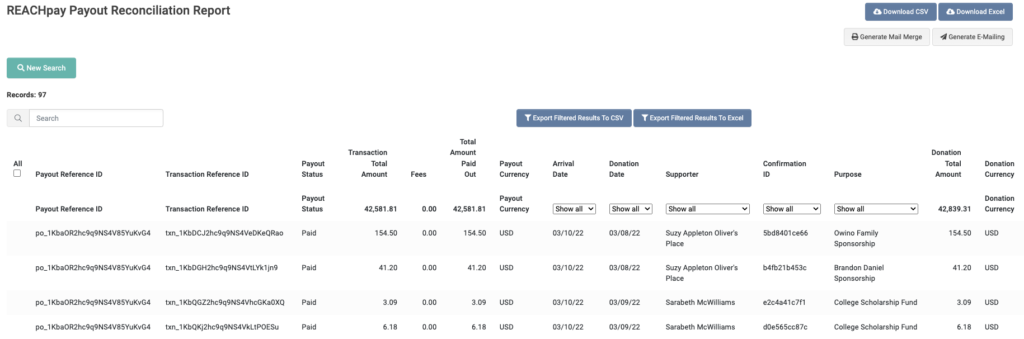
Each report row includes:
- Donation Date – The date the supporter made the donation
- Arrival Date – The expected deposit date into your bank account
Example:
For a report showing a payout for 3/10/22, the last donations shown will be 3/8/22. For a donation made on 3/8/22, the Arrival Date is 3/10/22–the funds from the donation should appear in your bank account on March 10.
Data can be sorted, downloaded, or exported as needed.
Important Note:
- This report only includes online donations processed through REACHpay. Offline donations or donations processed through other gateways will not be included.
The REACHpay Payout Reconciliation Report is a helpful tool to match your REACH records with your actual bank deposits for easier financial tracking and reporting.
Let’s Get Social