


A Pledge is a supporter’s promise to donate a specified total amount over a set period of time.
For example, a supporter might pledge $2,400 to be fulfilled over four years—either through $50 monthly installments or $600 annual payments. Once the total pledged amount has been received, the pledge is complete and no longer tracked.
Key Notes:
- REACH does not allow for pledges to be created for sponsorships.
- To view pledges tied specifically to Campaigns, view our Campaign Pledges article.
- Supporters are not required to set up recurring donations for their pledges, but recurring donations can be linked if desired.
How Pledges Work
Pledges in REACH are flexible—they do not require supporters to commit to a strict recurring donation schedule (monthly, quarterly, yearly, etc.). However, admins can create a recurring donation attached to a pledge, and expected payments will be tracked under Next Donation Due.
Because pledges are a passive process, REACH does not send automated reminders or notifications to supporters about outstanding balances. The system tracks received amounts and remaining balances, but supporters won’t be notified automatically.
If you want to inform supporters about their pledge status, you can manually send reminders using mail merge and email templates.
Managing Pledges
Viewing Pledges
Supporter Record: Under the Donations tab, in the Pledges section.
Example: If a supporter pledged $1,000 to the Empowering Women project and made a $25 donation, the status would show as Partial, with $975 remaining.
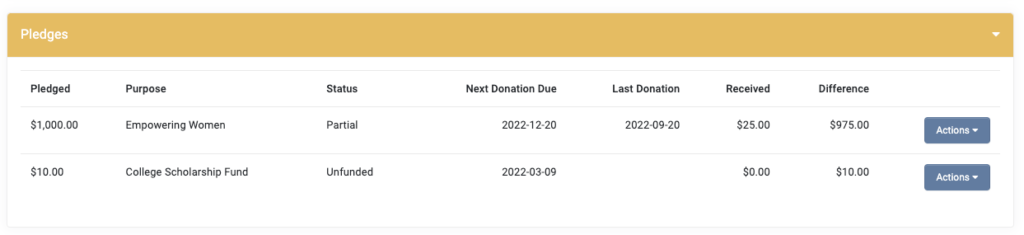
From the Pledge Record: Admins can Edit, Add a Donation, or Delete the pledge.
Creating a Pledge for a Supporter
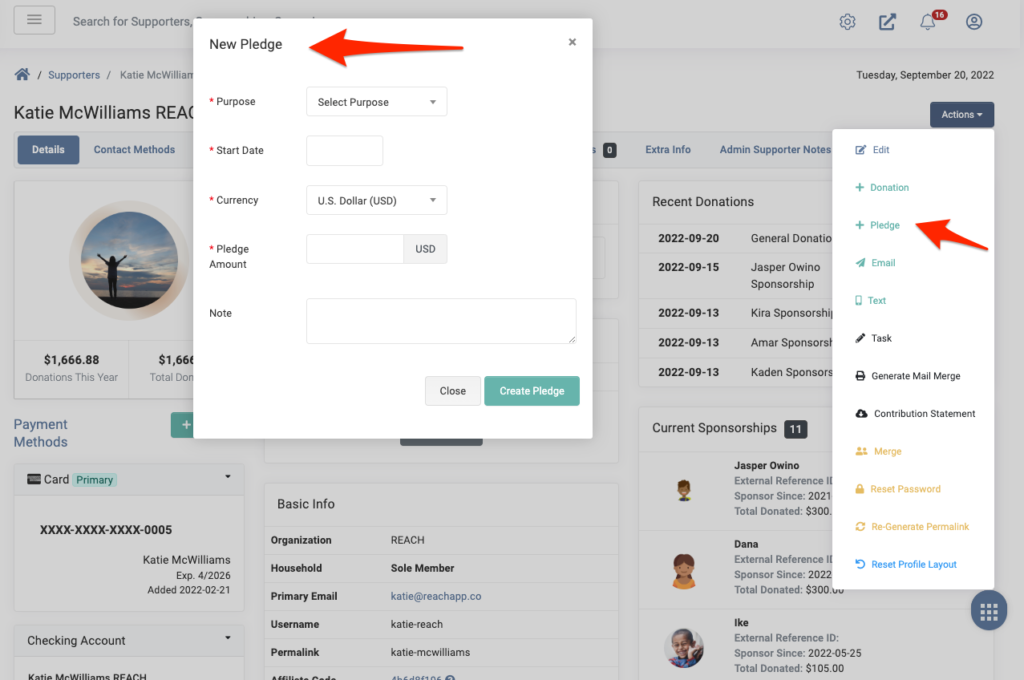
- From the supporter’s record, click Actions > + Pledge
- Enter the Purpose, Start Date, Currency, Total Amount, and any notes
- Click Create Pledge
Once saved, the pledge will appear as an option when adding donations for that supporter.
Adding a Donation to an Existing Pledge
Admins can add donations toward pledges on behalf of supporters in the admin console.
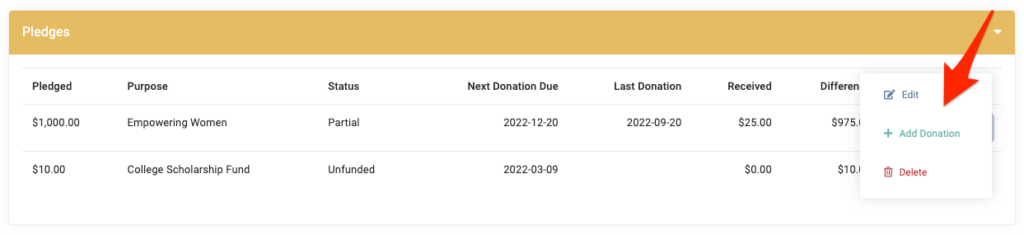
From the supporter’s record:
- Click +Donation and choose Attach to the Pledge, OR
- From Donations > Pledges, locate the pledge and click Actions > Add Donation
If the supporter wants a recurring donation tied to their pledge, select Recurring Donation options. REACH will then track expected payments under Next Donation Due.
Tracking & Reporting
- View a supporter’s remaining balance in their Donations tab.
- For a complete overview, go to Reports > Pledge Details.
Pledge Details Report
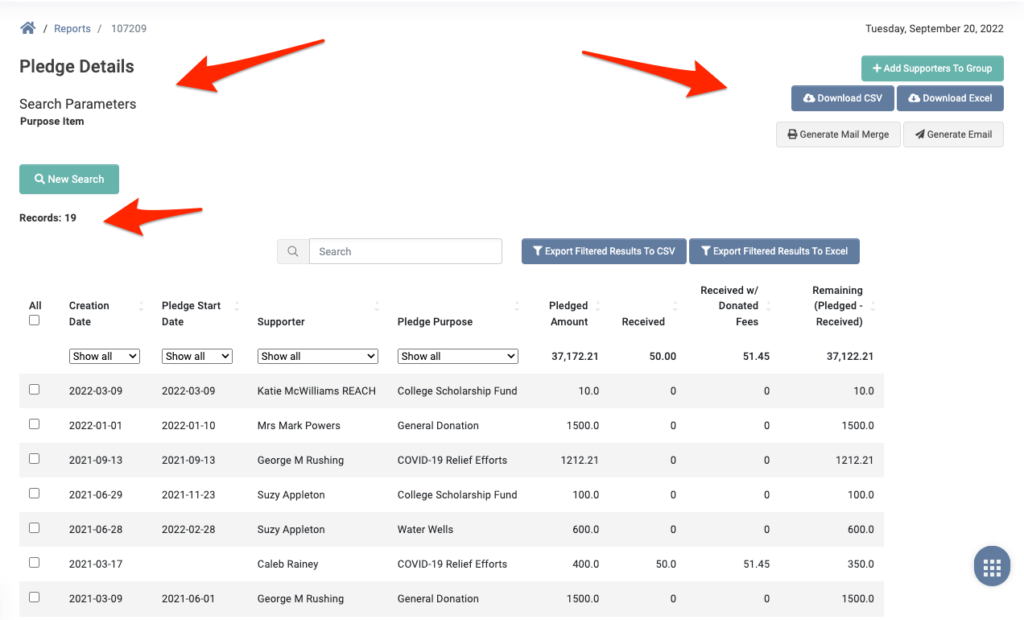
The Pledge Details Report includes:
- Total pledges (record count)
- Creation date
- Pledge start date
- Supporter name
- Pledge purpose
- Total pledged amount
- Amount received
- Amount received with donated fees
- Remaining balance
From the report, you can filter, create Supporter Groups, export CSV/Excel files, or generate mail merges/emails.
Public Pledges
Public Pledges allow supporters to create their own pledges through a public donation form.
Supporters can make public pledges for Campaigns, Projects, Places, and Donation Categories.
Public pledges are only available on Pro and Pro Plus plans.
Enabling Public Pledges
To enable this feature, first email our team to turn this on for your account.
Then, go to Settings > Donation Setup
- Select the Public Pledges tab
- Check Allow Public Pledges
- Click Save Changes
Notifications for Public Pledges
- Supporter Notification: After submitting, the supporter receives an email (similar to a donation receipt) confirming their pledge details.
- Admin Notification: Admins can receive an email each time a public pledge is made.
To enable Admin Notifications:
- Go to Settings > Admin Users
- Click Edit next to the admin user’s name
- Open the Notifications tab
- Check Successful Pledge
- Click Save Changes
Creating Public Pledge Links
You must create manual pledge links for each campaign, project, place, or donation category in which you wish to allow public pledges.
Examples:
https://yourdomain.reachapp.co/pledges/new?campaign_id=my-mission-triphttps://yourdomain.reachapp.co/pledges/new?place_id=indonesiahttps://yourdomain.reachapp.co/pledges/new?project_id=new-school-constructionhttps://yourdomain.reachapp.co/pledges/new?donation_category_id=general-fund
When supporters visit these links, they’ll see a public pledge form.
Here’s an example of a Projects page that includes an option to make a pledge donation.
Supporter Experience with Public Pledges
When a supporter clicks on the public pledge form, they will enter:
- Pledge amount
- Fund pledge by date
- First & last name (optional if pledging on behalf of an organization)
- Organization name (if applicable)
- Date of birth (optional)
- Contact info (address, city, state, zip, country)
They then click Submit to complete their pledge.
Where Public Pledges Appear
After submission, public pledges will be visible:
- On the Donations page under the Pledged tab
- In the Supporter’s record under Donations > Pledges
- On the Campaign/Project/Place/Category details page
Fulfilling Pledges as a Supporter
Supporters can fulfill their pledges directly from the Donor Portal.
- Log in to the Donor Portal
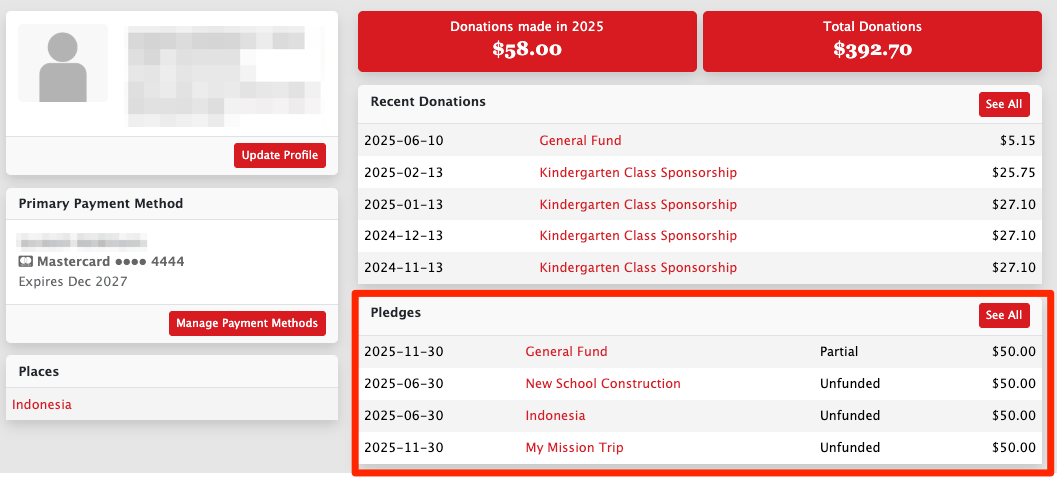
- From their profile, locate the Pledges section and click on the specific pledge
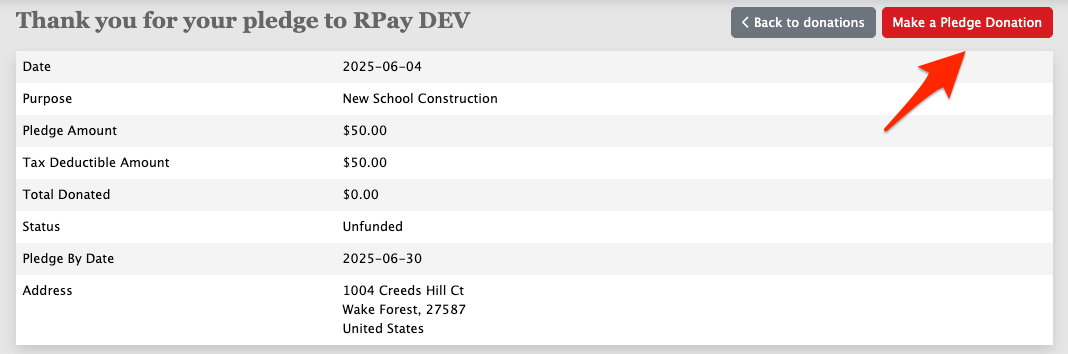
- Click Make a Pledge Donation
- Complete the donation
Once submitted, supporters will see the Total Donated and Status fields updated to reflect their new pledge balance.
Tip for Admins: You can share this process with supporters by sending them a quick how-to email. A simple message like:
“Hi [Name], you can easily make a donation toward your pledge by logging into your Donor Portal, clicking on your pledge under the Pledges section, and selecting Make a Pledge Donation.”
This helps guide supporters who want to fulfill pledges online.
Summary
- Admin-Managed Pledges are created manually by admins and tracked internally.
- Public Pledges, available to those on a Pro or Pro Plus plan level only, allow supporters to create their own pledges via public forms for campaigns, projects, places, or donation categories and fulfill pledges online through their Donor Portal.
- Pledges are flexible but passive—no automated reminders are sent unless you manually notify supporters.
- Reports and supporter records give you full visibility into pledge progress.
Let’s Get Social