
Your supporters may be able to double or increase their donations through their employers’ matching gift programs, but many donors don’t know that matching gifts are available to them.
The Double the Donation integration connects REACH with Double the Donation’s 360MatchPro platform to help you identify matching gift opportunities, provide donors with instructions for submitting their matching gift, and automate follow-up communications.
Matching gifts can be a valuable fundraising opportunity because they allow your organization to generate additional revenue from gifts your supporters are already making.
Note: This integration requires a separate account with Double the Donation. Visit Double the Donation to learn more about the REACH integration, request a demo, and obtain pricing.
Questions? Watch our REACH + Double the Donation Webinar to learn more about the integration, see how the automation works, and get started.
Why Matching Gifts Matter
Employer matching gifts can provide an additional source of funding without requiring your organization to find a new donor.
Double the Donation provides tools to help organizations:
- Identify matching gift opportunities by allowing donors to search for their employer during the giving process.
- Make it easy for donors to take the next step with personalized instructions for submitting a matching gift request.
- Automatically follow up with donors who may be eligible for a matching gift.
- Reach donors who didn’t identify their employer when they originally made their donation.
- Track matching gift opportunities and donor engagement through 360MatchPro.
- Manage recurring donations and other matching gift opportunities through the platform.
Many donors are unaware that their employer offers a matching gift program. Putting a matching gift search directly in the giving experience—and following up afterward—can help your organization capture opportunities that might otherwise be missed.
For additional matching gift statistics and resources, see Double the Donation’s Matching Gift Statistics and Ultimate Guide to Matching Gifts.
Set Up the Double the Donation Integration
Once you have a Double the Donation 360MatchPro account, you can connect it to REACH.
In REACH:
- Go to Settings > Site Integrations.
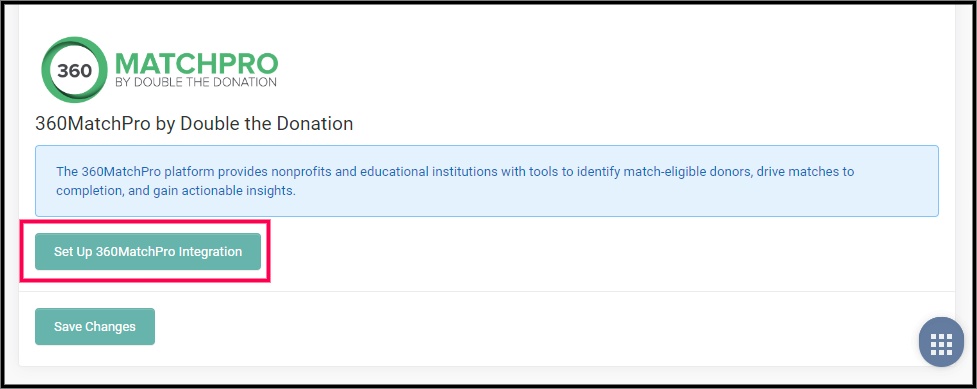
- Scroll to 360MatchPro by Double the Donation.
- Click Set Up 360MatchPro Integration.
- Retrieve your Public and Private API keys from your 360MatchPro account.
- Enter the keys in REACH.
- Check Enabled to activate the integration on your default donation form.
- Click Save.
Enable Matching Gifts on Custom Donation Forms
You can also add the matching gift search to any of your custom donation forms.
- Go to Settings > Donation Forms.
- Open the custom donation form you want to update.
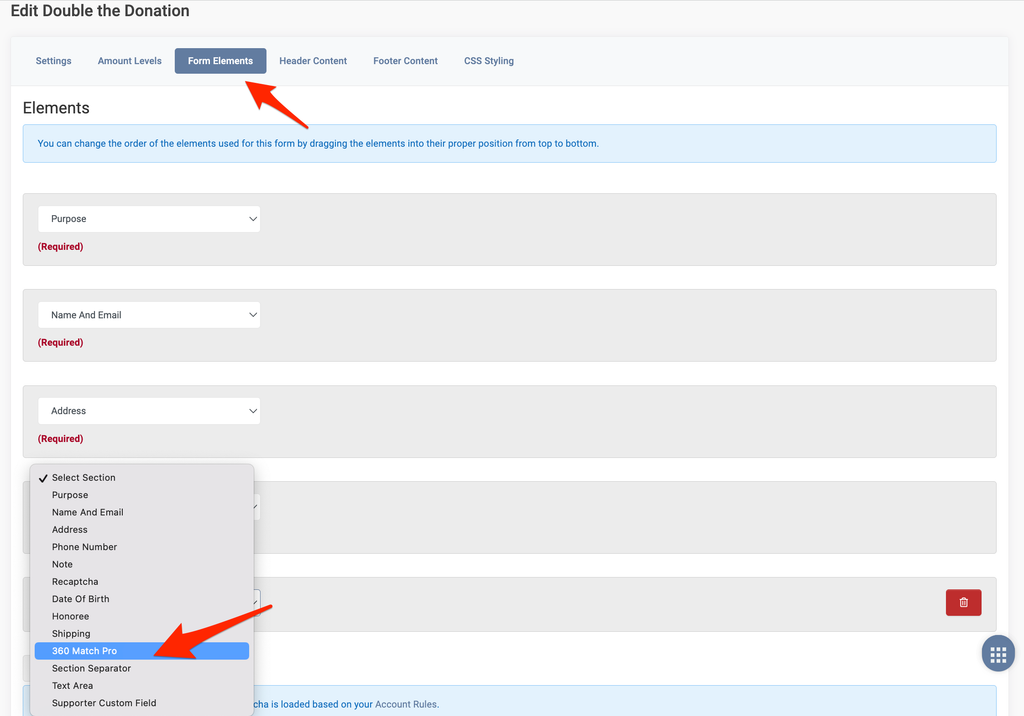
- Go to the Form Elements tab.
- Click Add Element.
- Select 360 Match Pro.
- Click Save.
How the Integration Works
Once connected, 360MatchPro works alongside your REACH donation forms to help identify and follow up on matching gift opportunities.
1. Donors Search for Their Employer
When a donor gives through a REACH donation form with 360MatchPro enabled, they can search for their employer to determine whether the company offers a matching gift program.
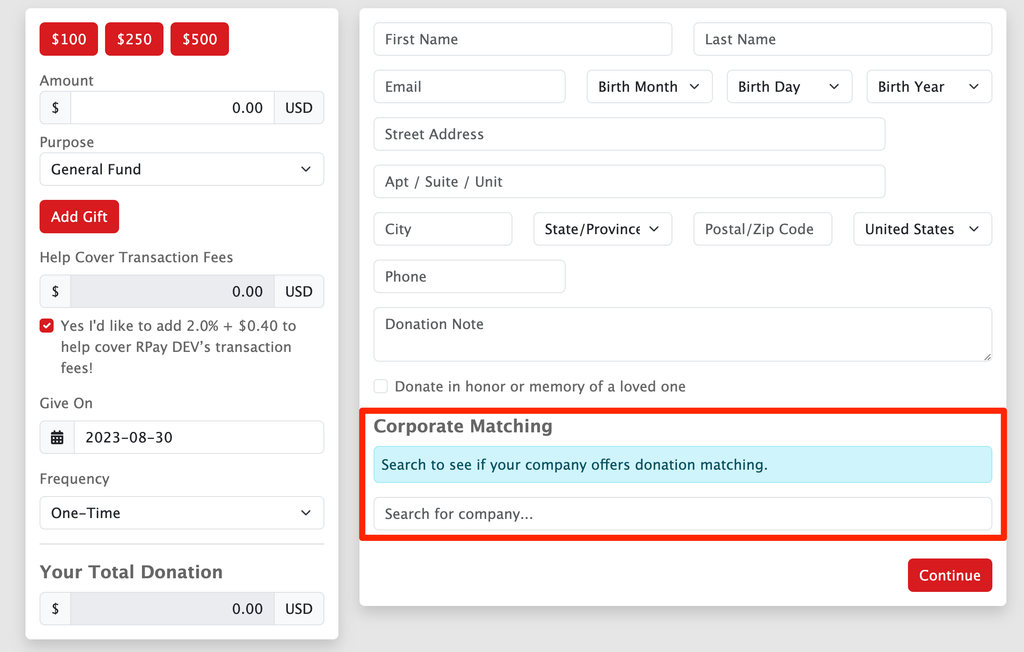
The search tool accounts for major brands, subsidiaries, and parent companies. If a company isn’t found in the database, the donor’s entry is still passed to 360MatchPro as text.
2. Donors Receive Matching Gift Instructions
After making their donation, eligible donors can receive personalized instructions for completing their employer’s matching gift process.
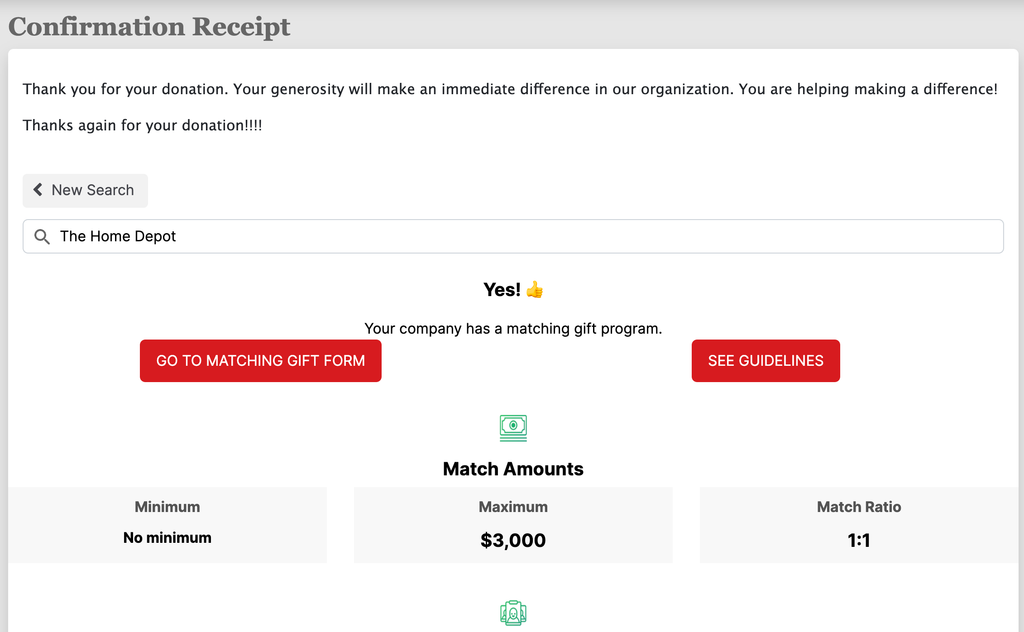
Donors who did not search for their employer during the donation process can also have an opportunity to do so from the confirmation page.
3. Donors Receive Automated Follow-Up
Donation records are passed from REACH into 360MatchPro, allowing Double the Donation to send automated matching gift emails.
All donors can receive follow-up messaging—not just donors who identified their employer during the donation process.
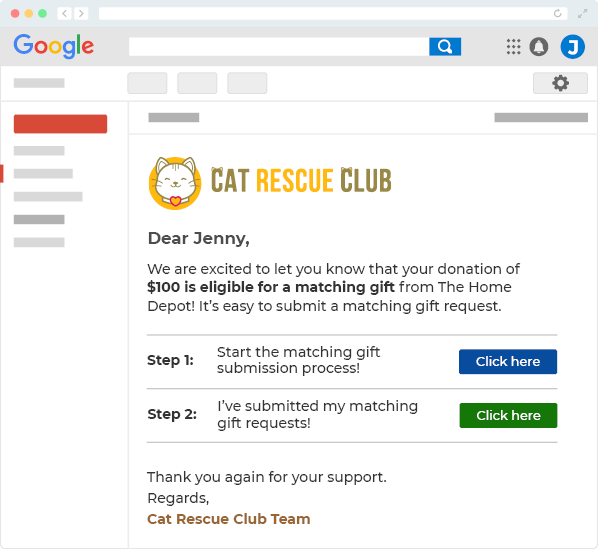
These emails give donors another opportunity to discover their eligibility and complete the matching gift process.
Double the Donation allows you to customize your automated emails, including:
- Sending domain and email address
- Sending limits
- Email appearance, including logo and branding
- Footer text
- Ineligible reason survey
- Email redirects
4. Track Matching Gift Opportunities
360MatchPro provides tools to monitor matching gift opportunities and donor engagement.
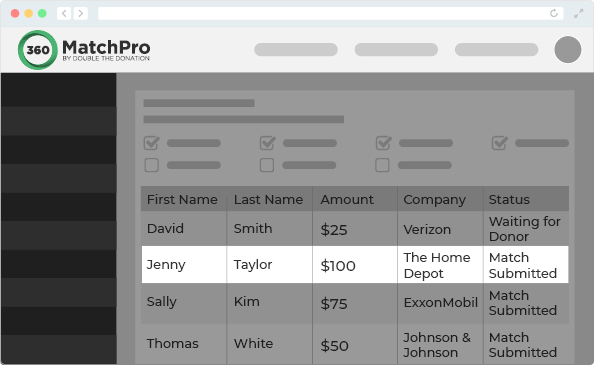
The platform can display information such as:
- Donor name
- Donation amount
- Company name
- Matching gift status
- Email activity
You can track individual matching gift opportunities as well as overall matching gift activity.
Additional reporting includes areas such as:
- Leading companies
- Eligible but not submitted gifts
- Repeat donors
- Campaign comparisons
- Potentially miscategorized ineligible gifts
- Missed communications
Create a Dedicated Matching Gift Page
We recommend creating a dedicated Matching Gift page on your website.
A dedicated page gives supporters a place to search for their employer’s matching gift program even when they aren’t actively making a donation. You can also link to this page from your matching gift emails, fundraising communications, and social media posts.
You can see an example on our REACH demo Matching Gift page.
Create the Page in REACH
If you’re using REACH for your website:
- Go to Portal Content > Pages.
- Click Add a Page.
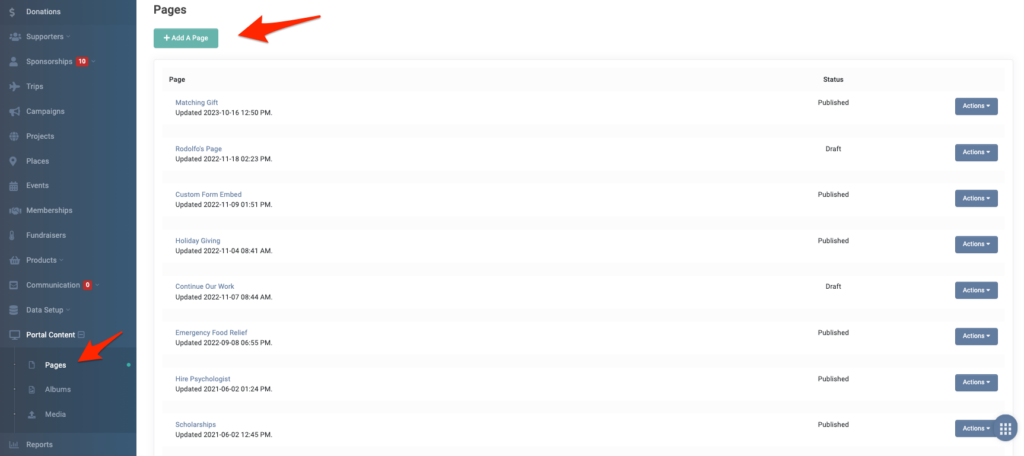
- Add a Title.
- Add text to the Body field.
- Add any desired media.
Double the Donation provides additional guidance on creating a dedicated matching gift page, including suggested content.
Add the Double the Donation Search Tool
You’ll find the embed code in your Double the Donation account under Settings > Plugin Settings.
On your REACH page:
- Click the Insert/Edit HTML Block button.
- Paste the embed code provided by Double the Donation.
- Save your page.
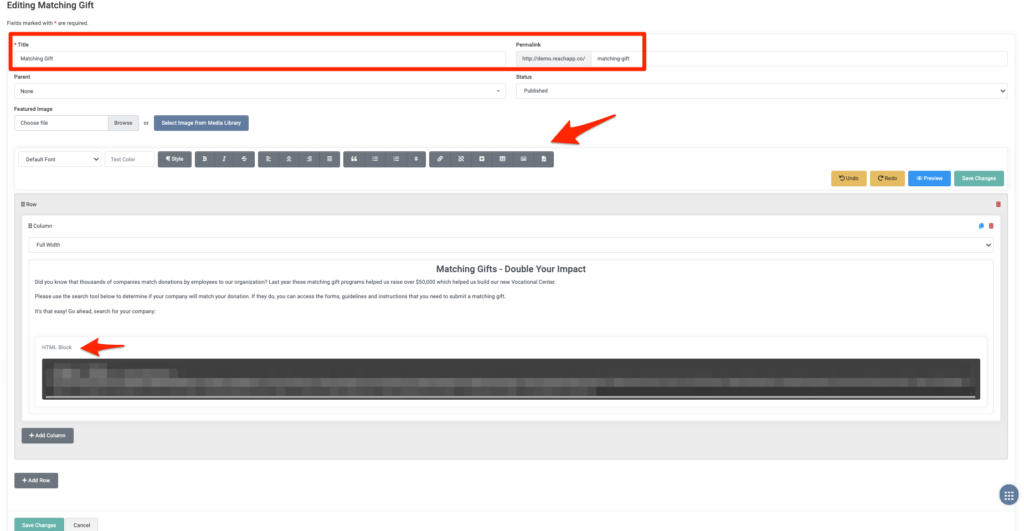
If you’re using the previous Page editor in REACH, add the code under Tools > Source Code.
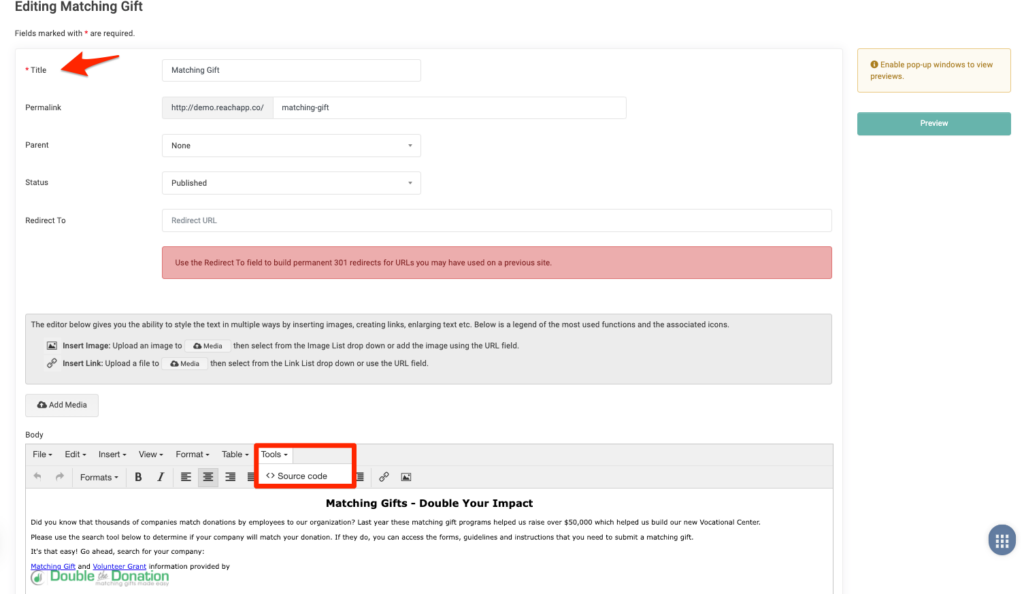
See Double the Donation’s instructions for customizing the search text.
Add Your Matching Gift Page to 360MatchPro
Once your page is live, add its URL to your 360MatchPro account so Double the Donation can link to it from automated donor emails.
See Double the Donation’s instructions for adding your plugin URL.
Fundraising Tip
Don’t limit your matching gift promotion to the donation form.
Consider promoting your Matching Gift page throughout the year and including it in:
- Donation confirmation emails
- Thank-you emails
- Fundraising appeals
- Newsletters
- Social media posts
- Event communications
- Year-end giving campaigns
The goal is to make it easy for supporters to answer one simple question: “Does my employer match donations?”
A strong matching gift strategy can help your organization uncover additional funding opportunities from the donors you already have.