
Supporter Campaigns give your supporters a way to become fundraisers for your organization. Instead of simply asking friends and family to donate, supporters can create their own personalized fundraising page, set a goal, share their story, and invite others to give.
This can help your organization reach new donors, expand your fundraising network, and raise additional support for the causes your supporters care about.
Supporters can start campaigns from their Donor Portal or from your organization’s Campaigns page.
Ideas for Supporter Campaigns
Supporter Campaigns can be used for almost any fundraising effort. Some common examples include:
Mission Trips
A supporter traveling with your organization can create a campaign to help cover the cost of a mission trip or raise funds for the work they’ll be doing.
Birthday Fundraisers
Instead of asking for birthday gifts, supporters can ask friends and family to make a donation to your organization.
Events and Team Fundraising
Supporters can create individual or team campaigns around events such as golf tournaments, races, walks, or other fundraising activities.
Specific Projects or Needs
Supporters can rally their networks around a specific need, such as clean water, school supplies, medical care, a new vehicle, or a building project.
Matching Campaigns
A supporter can create a campaign to encourage others to give by offering to match donations up to a certain amount.
Personal Fundraising Challenges
Supporters can create their own fundraising goal and invite their friends, family, coworkers, or social networks to help them reach it.
For example, a Supporter Campaign could raise money for a medical mission trip, school uniforms, new textbooks, clean water wells, a new van, or a vocational training center. You can see examples of these types of campaigns on the Campaigns page.
How Supporter Campaigns Work
Once a supporter creates a campaign, REACH gives them a dedicated fundraising page where they can:
- Add a campaign title and fundraising goal
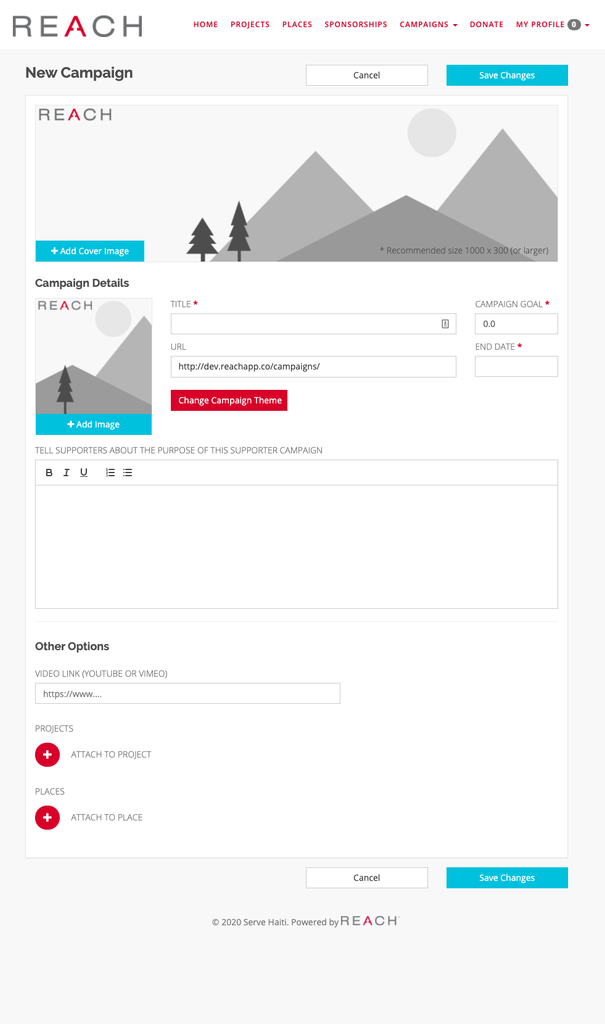
- Add a cover image and profile image
- Tell their story and explain why they’re fundraising
- Add YouTube or Vimeo videos
- Set a campaign end date
- Associate the campaign with a Project or Place
- Share their campaign using its unique URL
- Post updates to keep supporters engaged
Donations made through the campaign are tracked back to the supporter campaign, allowing supporters and your organization to see progress toward the fundraising goal.
How to Start a Fundraising Campaign as a Supporter
Note: Admins cannot start campaigns on behalf of supporters. The campaign must be created by the supporter.
Supporters must be signed in to their Donor Portal to start a campaign. New supporters can create an account when prompted.
A supporter can start a campaign from:
- Their profile page
- Campaigns > Start a Campaign in the menu bar, if enabled
- Your organization’s Campaigns page, if enabled
The supporter can then enter their campaign information, including:
- Campaign Title
- Fundraising Goal
- End Date
- Description/Purpose
- Cover and Profile Images
- YouTube or Vimeo Video
- Project
- Place
The campaign URL is automatically created from the campaign title.
Campaign Themes
If your organization has created Campaign Themes, supporters can choose an existing theme when creating their campaign.
Campaign Themes are useful when you expect multiple supporter campaigns to have a similar purpose or cause. They can help keep campaigns visually consistent and provide supporters with a starting point for their own fundraising page.
Supporters can also create a campaign without using a Campaign Theme.
Once the supporter has completed their campaign, they click Save Changes to create it.
How to Encourage Supporters to Start Campaigns
Supporter Campaigns work best when your supporters know the option is available.
Consider promoting Supporter Campaigns in your:
- Email newsletters
- Donor Portal
- Event communications
- Mission trip information
- Birthday or holiday campaigns
- Social media posts
- Fundraising appeals
You can also encourage supporters to start a campaign around a specific fundraising need rather than simply asking them to fundraise for your organization in general.
For example:
“Are you traveling with us on our next medical mission? Start your own campaign and invite your friends and family to help provide medical care to families in need.”
A specific purpose gives supporters an easy story to share with their networks.
How Supporters Post Campaign Updates
Supporters can keep their donors engaged by posting updates throughout their campaign.
To post an update:
- The supporter logs into the Donor Portal.
- They navigate to Campaigns and select their campaign.
- They click New Message next to the campaign.
- They write their update and click Create.
Campaign updates are a great way for supporters to share progress, thank donors, post photos, provide updates from a mission trip, or let their network know when they’re getting close to their goal.
Note: If your organization requires admin approval, campaign updates must be approved before they are published.
Admin Approval for Supporter Campaigns
If your organization requires approval, supporter campaigns will not be publicly visible until they have been approved by an admin.
This can give your organization an opportunity to review campaigns before they are published.
See Approving Supporter Campaigns for more information.
Managing the Visibility of Supporter Campaigns
By default, supporter campaigns can appear alongside your organization’s other campaigns on your Campaigns page.
If you prefer to keep your main Campaigns page focused on organization-created campaigns, you can make supporter campaigns unlisted.
Make Supporter Campaigns Unlisted
Go to:
- Settings > General Settings > Campaigns tab
- Check Make Supporter Campaigns Unlisted and click Save Changes.
When enabled, only organization-created campaigns will appear on your main Campaigns page. Supporter campaigns will still be accessible through their parent campaign or by sharing the campaign’s direct link.
Hide Supporter Campaigns from the Donation Page
You can also prevent supporter campaigns from appearing in the Purpose dropdown on your donation page.
Go to:
- Settings > Donation Categories
- Uncheck Include supporter campaigns in the Purpose dropdown on the Donation page.
- Click Save Changes.
How to Get the Most from Supporter Campaigns
Supporter Campaigns are a way to expand your fundraising beyond your organization’s existing audience.
Encourage supporters to think about who they can reach that you may not be reaching directly—friends, family, coworkers, community groups, and social networks.
The most effective campaigns often have:
- A specific fundraising goal
- A clear explanation of what the funds will accomplish
- A personal story about why the supporter cares
- Photos or video that help tell the story
- Regular updates as the campaign progresses
- A simple call to action asking people to give or share
By giving your supporters the tools to tell their own stories and fundraise on your behalf, Supporter Campaigns can help turn your existing supporters into an extension of your fundraising team.