
You can accept ACH/EFT donations using REACHpay as your payment gateway. This article explains how to enable ACH/EFT for your account and how supporters can add and use their US bank accounts when donating.
Note: ACH/EFT is only available to organizations using REACHpay. If you’re using a different payment gateway, refer to our list of supported gateways that accept ACH/EFT.
Quick Start: How to Begin Using ACH/EFT with REACHpay
For Organizations:
- Email Support to enable ACH/EFT on your REACHpay account.
- ACH/EFT is free to enable. Fees are 1% + $1 per transaction.
- Optional: Update your Suggested Additional Donation Amount at
Settings > Donation Setup > Donation Form Settings.
For Supporters:
- On the donation form, choose US Bank Account to login to your bank to verify your account or click Enter bank details manually instead to enter account details and verify via micro deposits
- Once verified, the account can be saved and used for recurring donations.
Enabling ACH/EFT for Your Organization
If you’re already using REACHpay and want to begin accepting ACH/EFT donations:
- Email Support to request that ACH/EFT be enabled.
- Once enabled, supporters will see US Bank Account as a payment option on the donation form and in the Donor Portal.
Transaction Fees:
- Free to enable
- 1% + $1 per ACH/EFT transaction
Note: You can ask donors to help cover processing fees by updating the Suggested Additional Donation Amount under:
Settings > Donation Setup > Donation Form Settings
Note: The suggested amount is the same regardless of whether the supporter uses a card or bank account.
Timing:
- Funds are typically withdrawn within 1–3 business days. During this time, donations are marked as pending.
- Donations are marked complete in REACH within 2–4 business days.
- To view a list of pending donations, generate a Donation Details Report and set the Status filter to Pending.
Supporter Setup for ACH/EFT Donations
Supporters have two secure options to add their US bank account for donating.
Note: Only the supporter can complete this step, as account verification is required to confirm ownership.
Once verified, the bank account can be saved, used for future donations, and set as the primary payment method or used for all recurring donations.
Option 1: Link a US Bank Account (Instant Verification)
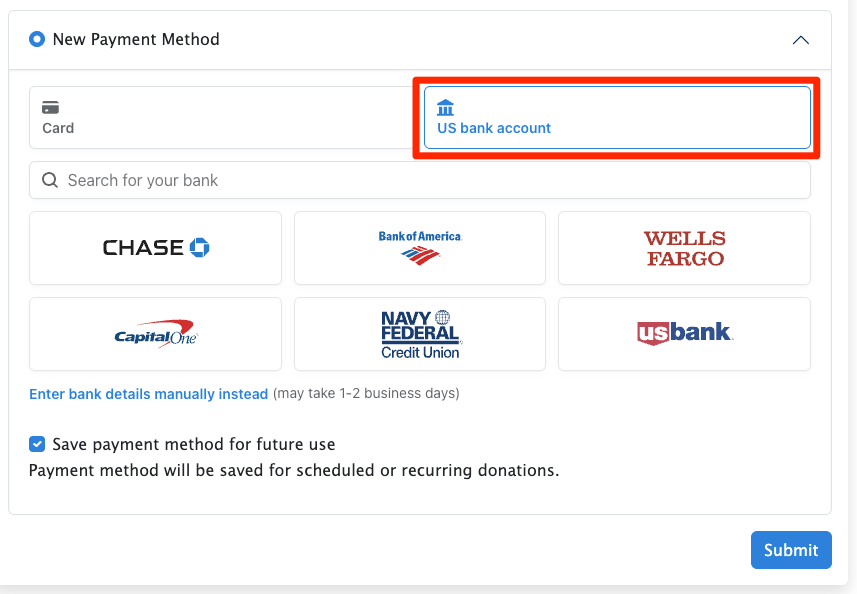
This method uses bank login credentials to verify the account immediately.
Steps:
- Select US Bank Account
- Choose their bank from the list
- Agree to terms and conditions
- Log in to their online banking
- Select the account to link
- (Optional) Save payment method for future use
Confirmation Email:
After setup, supporters receive an ACH Confirmation Email with:
- Agreement Date
- Account Holder Name
- Financial Institution
- Routing Number
- Last 4 digits of the Account Number
Option 2: Micro-Deposit Verification (Manual Entry)
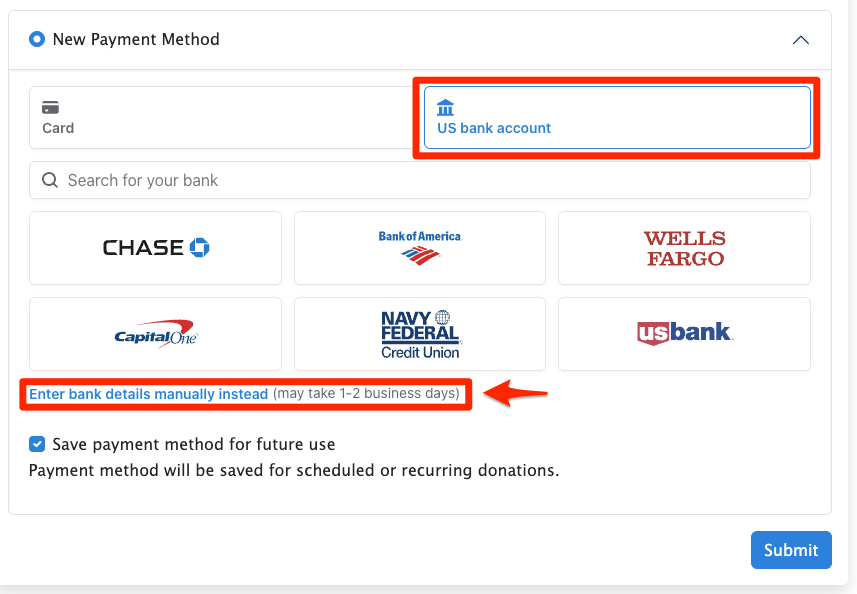
This method does not require a bank login but takes longer to complete.
Steps:
- Click US bank account, then select Enter bank details manually
- Enter the routing and account numbers
- Wait for 1–2 small deposits to appear in the bank account (typically 1–2 business days)
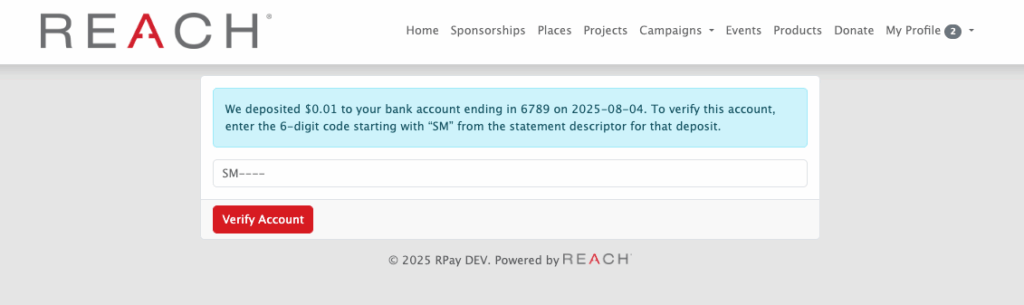
- Complete verification by entering the 6-digit code starting with “SM” from the micro-deposit statement description
Complete ACH Verification as a Supporter:
Supporters should follow the instructions in the confirmation email or use the verification link to enter the 6-digit code from the deposit statement description, then click Verify Account.
Complete ACH Verification as an Admin:
Admins can navigate to the supporter’s record. Under Payment Methods, the ACH account will display Verification Pending.
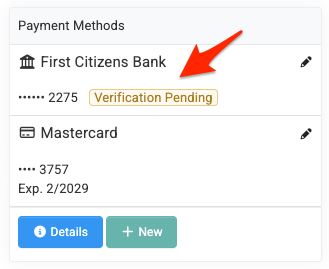
- Click the Edit (pencil) icon or Details
- Select Complete Verification
- Enter the 6-digit code starting with “SM” from the supporter’s statement descriptor
- Click Verify
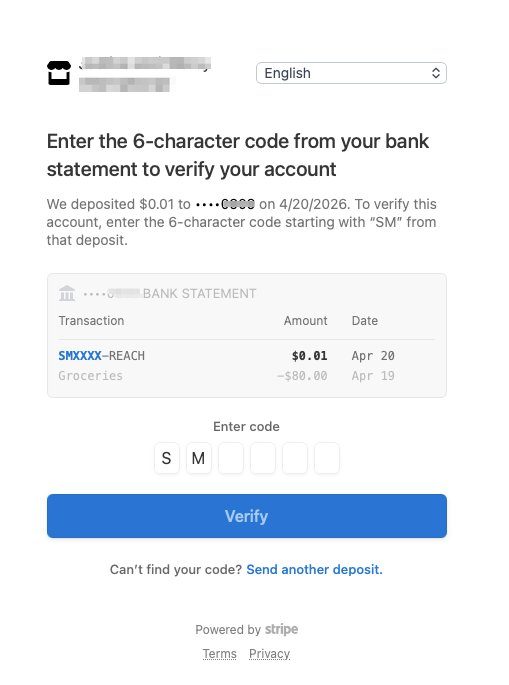
Once verified, the account will be available to use and save.
Note: Verification must be completed within 10 days. After this period, the verification code expires and the donation will be marked Incomplete. If the Added Date on the Details screen is more than 10 days old, the supporter must re-add the payment method or start a new donation, as the original attempt will not complete.
If an admin attempts to complete verification after the 10-day window, a Stripe-generated “Page not found” message will be displayed. In this case, admins can select Edit > Remove Payment Method to delete the unverified payment method.
Communication to Supporters
Here is our recommended message to send to your supporters with instructions on how to set up their US bank accounts:
Dear [Supporter’s Name],
As a supporter, you have two secure options to add a U.S. bank account for donating.
You can complete either option directly from our donation page or by logging into your Donor Portal and navigating to Payment Information > + Add Payment Method.
Please note: For security reasons, your involvement is required in completing this process. Verification is required to confirm account ownership.
Once your bank account is verified, you can save it for future donations, set it as your primary payment method, and use it for recurring donations.
Option 1: Link a U.S. Bank Account (Instant Verification)
This method uses your online banking login to verify your account immediately.Steps:
- Select “U.S. Bank Account”
- Choose your bank from the list
- Agree to the terms and conditions
- Log in to your online banking
- Select the account you would like to link
- (Optional) Save the payment method for future use
After setup, you will receive an ACH Confirmation Email with your account details.
Option 2: Micro-Deposit Verification (Manual Entry)
This method does not require your bank login but takes longer to complete.Tip: If you cannot find your bank using Option 1, use this method.
Steps:
- Select “U.S. Bank Account” and choose “Enter bank details manually”
- Enter your routing and account numbers
- Wait for 1–2 small deposits to appear in your bank account (typically 1–2 business days)
- Follow the instructions in your confirmation email or use the verification link to enter the 6-digit code (starting with “SM”) from the deposit description
Once verified, your account will be available to use and can be saved for future donations.
Important: Verification must be completed within 10 days. If not completed in time, the payment method will expire and you will need to re-add your bank account. Any attempted donations made when entering the new payment method will not process.
If you have any questions or need assistance, please don’t hesitate to reach out. We’re happy to help.